
AI Audit Trail Checklist: 16 Fields Every AI Action Needs
A field-by-field AI audit trail checklist for finance teams: the 16 fields every AI action should record, an example record, and three SQL tests to prove the trail is complete.
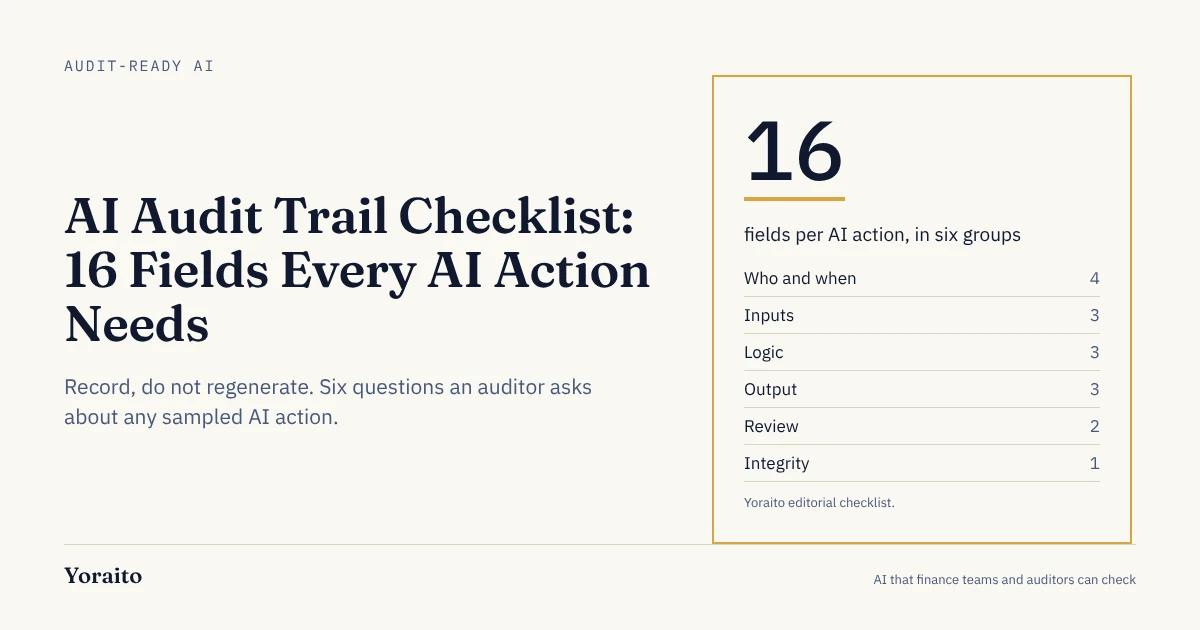
If an AI tool matched a bank line, coded an invoice or drafted a journal entry last March, could you show your auditor exactly what it saw, which logic it ran and who signed off? This checklist lists the 16 fields that make the answer yes, grouped so you can test any tool against it in an afternoon.
TL;DR: An AI audit trail should record 16 fields for every AI action: who and when (ID, type, initiator, timestamp), inputs (source IDs, snapshot hash, data as-of time), logic (rule, model and configuration versions), output (result, reason, confidence and routing), review (reviewer decision, override) and integrity (append-only hash and retention).
What is an AI audit trail?
An AI audit trail is a stored, tamper-evident record of every action an AI system takes, with enough detail that someone other than the vendor can see the inputs, the logic version, the output and the human decision, and reperform it later.
That last part is where most logging falls short. A system log says a job ran. An audit trail says which 214 bank lines went in, which version of which rule matched them, why line 181 was sent to a reviewer and who approved it on October 3.
Finance needs the stronger version because of how auditors work. They sample items, trace them to source and reperform the logic. If your AI tool cannot hand over one complete record per item, the auditor either tests around the tool or expands testing on your team.
Why do auditors care about AI actions specifically?
Because generative AI does not always give the same answer twice. In its July 2024 spotlight on generative AI, PCAOB staff noted "the lack of consistent output produced by GenAI, which raise questions around the auditability of certain GenAI-created output" (PCAOB staff spotlight, July 2024). The same document says "human involvement in supervising the use of GenAI and reviewing GenAI output continues to be important."
If you cannot rely on regenerating an answer, you have to store it, along with everything that produced it. That is the whole design principle behind the checklist below: record, do not regenerate.
The standards backdrop is moving in the same direction:
- The PCAOB amended AS 1105 and AS 2301 for audit procedures that use technology-assisted analysis of electronic information, effective for audits of fiscal years beginning on or after December 15, 2025 (PCAOB). For public companies with a calendar year end, that is the 2026 audit.
- COSO published Achieving Effective Internal Control Over Generative AI in February 2026, mapping gen AI risks to the five COSO components (Journal of Accountancy).
- NIST released its Generative AI Profile (NIST AI 600-1) on July 26, 2024, as a companion to the voluntary AI Risk Management Framework (NIST).
None of these hands you a field list. They tell you evidence will be asked for. The checklist turns that into columns.
For the survey data on how far finance teams trust AI output today, see our 2026 trust in finance AI statistics.
What should every AI action record? The 16-field checklist
Group the fields into six questions an auditor will ask about any sampled item. If a tool leaves any field empty, you should know why before you rely on it.
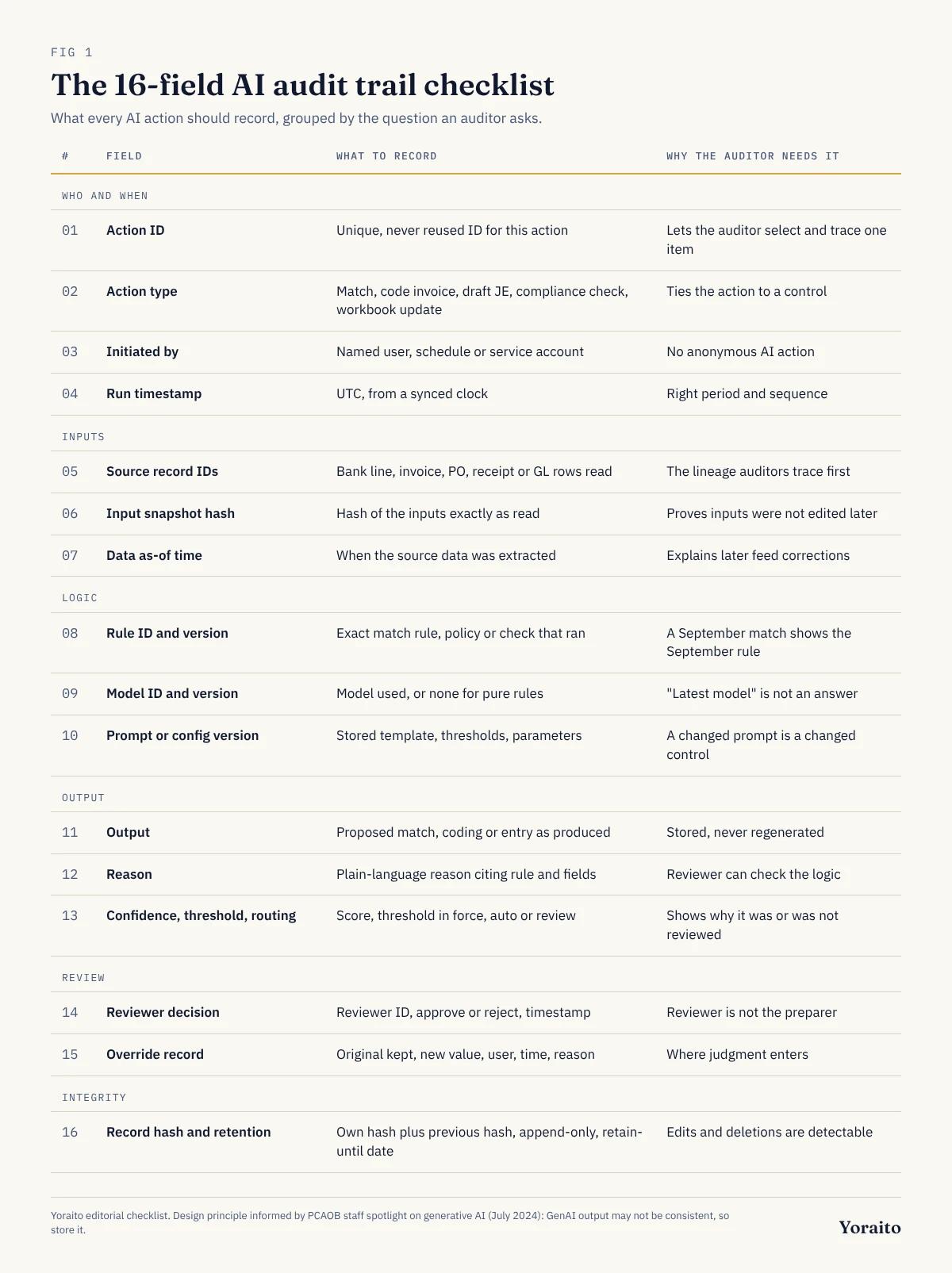
Who and when
- 1. Action ID: a unique, never reused identifier for this single action; lets the auditor select and trace one item.
- 2. Action type: match, code invoice, draft journal entry, compliance check, workbook update; tells the auditor which control the action belongs to.
- 3. Initiated by: the named user, schedule or service account that started the run; there is no anonymous AI action.
- 4. Run timestamp: in UTC, from a synced clock; puts the action in the right period and sequence.
Inputs
- 5. Source record IDs: the bank line, invoice, PO, receipt or GL rows the action read; this is the lineage auditors trace first.
- 6. Input snapshot hash: a hash of the inputs exactly as read; proves the inputs were not edited after the fact.
- 7. Data as-of time: when the source data was extracted; explains why a later bank feed correction did not show up.
Logic
- 8. Rule ID and rule version: the exact match rule, policy or check that ran; a September match must still show the September rule.
- 9. Model ID and version: the model used, or null if the step was pure rules; "latest model" is not an answer.
- 10. Prompt or configuration version: the stored template, thresholds and parameters; a changed prompt is a changed control.
Output
- 11. Output: the proposed match, coding or entry, stored as produced, never regenerated.
- 12. Reason: a plain-language explanation that cites the rule and the fields that drove the result.
- 13. Confidence, threshold and routing: the score, the threshold in force and whether the item was auto-applied or sent to review.
Review
- 14. Reviewer decision: reviewer ID, approve or reject, timestamp; the reviewer cannot be the preparer or the initiating account.
- 15. Override record: original output kept, new value, user, timestamp and a required reason; overrides are where judgment enters.
Integrity
- 16. Record hash and retention: each record carries its own hash and the previous record's hash, is append-only and has a retention date.
Two of these deserve extra attention. Field 9 can legitimately be empty: a deterministic rule that matches on amount, date and reference does not need a model, and saying so is useful evidence. Field 13 is where many tools are thin: a bare "92% confident" means little unless the record also says which threshold applied and what happened next.
For how these fields show up in a real review workflow, see AI journal review needs governance, not just automation.
Want a record like this for every match, with the SQL that produced it? Join the Yoraito waitlist for early access.
What does one complete record look like?
Here is one bank reconciliation action, fully recorded. The data is illustrative, not from a customer.
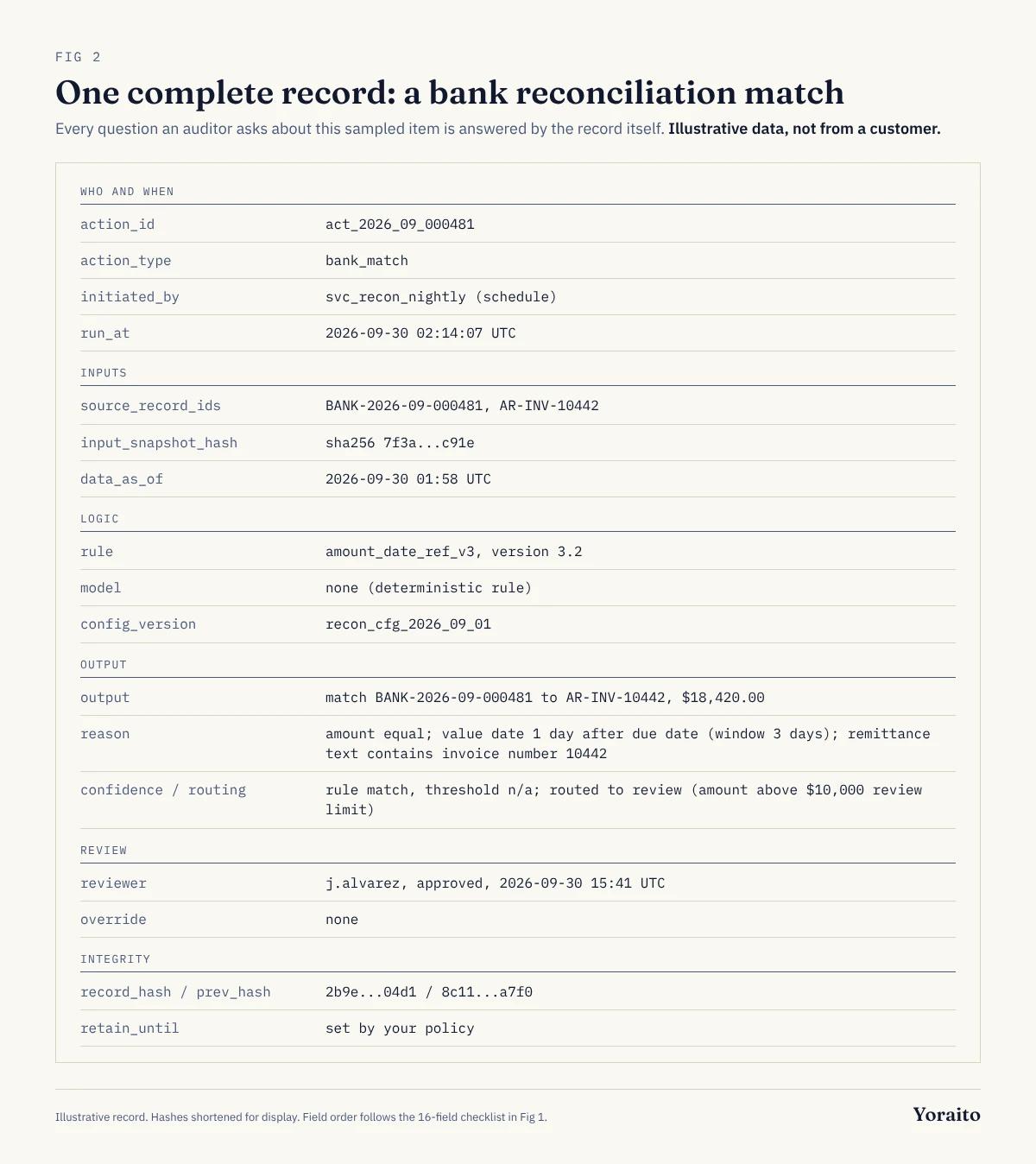
- action_id: act_2026_09_000481; action_type: bank_match
- initiated_by: svc_recon_nightly (schedule); run_at: 2026-09-30 02:14:07 UTC
- source_record_ids: BANK-2026-09-000481, AR-INV-10442
- input_snapshot_hash: sha256 7f3a...c91e; data_as_of: 2026-09-30 01:58 UTC
- rule: amount_date_ref_v3, version 3.2; model: none (deterministic rule)
- config_version: recon_cfg_2026_09_01
- output: match BANK-2026-09-000481 to AR-INV-10442, $18,420.00
- reason: amount equal; value date 1 day after due date (window 3 days); remittance text contains invoice number 10442
- confidence: rule match, threshold n/a; routing: review (amount above $10,000 review limit)
- reviewer: j.alvarez, approved, 2026-09-30 15:41 UTC; override: none
- record_hash: 2b9e...04d1; prev_hash: 8c11...a7f0; retain_until: set by your policy
Read it the way your auditor would. They pick the item, confirm the bank line and invoice exist and match the snapshot hash, look up rule version 3.2 and reperform it, check that the review limit routed it correctly, and confirm the approver is not the service account. Every step is answered by the record. Nothing depends on asking the vendor.
How do you test whether your trail is complete?
A checklist is only useful if you can test it. If your AI actions land in tables you can query, three checks cover most of the risk. Run them monthly, and hand the output to your auditor as part of your PBC evidence.
-- 1. Actions routed to review with no reviewer decision
SELECT action_id, action_type, run_at
FROM   ai_actions
WHERE  routing = 'review'
  AND  reviewer_id IS NULL
  AND  run_at < CURRENT_DATE - INTERVAL '2 days';

-- 2. Outputs missing the logic needed to reperform them
SELECT action_id, action_type
FROM   ai_actions
WHERE  rule_version IS NULL
   OR  config_version IS NULL
   OR  input_snapshot_hash IS NULL;

-- 3. Reviewer is the same identity that prepared the action
SELECT action_id, initiated_by, reviewer_id
FROM   ai_actions
WHERE  reviewer_id = initiated_by;
Each query should return zero rows. When it does not, you have found a control gap before your auditor did. A fourth check, recomputing the hash chain, catches edited or deleted records; most databases can do it with a window function over record_hash and prev_hash.
If your AI tool cannot give you a table like ai_actions at all, that is the finding.
How long should you keep AI audit trail records?
There is no AI-specific retention rule to point to, so anchor on what already applies. Under SEC Rule 2-06 of Regulation S-X, adopted in January 2003, accounting firms must keep records relevant to audits and reviews of issuers, including workpapers, for seven years after the audit or review (SEC). That rule binds the auditor, not you, but it tells you how far back questions about a sampled item can reach.
Practical guidance for the company side:
- Set a retention class for AI action records in your records policy, agreed with counsel and your auditor, rather than inheriting the vendor's default.
- Keep inputs as hashes plus references if storing full copies is impractical, but make sure the referenced source records are retained just as long.
- Put retention and an exit export in your vendor contract, so records survive a tool change.
Where do AI audit trails usually break?
Common gaps fall into five patterns. Use this as a quick red flag list.
- Overwritten outputs: an override replaces the AI's value, so the original decision is gone.
- "Latest model" logic: no model or prompt version is stored, so last quarter's outputs cannot be explained.
- Explanations generated on demand: the reason is produced when you click, not stored with the action, so it may not match what happened.
- Service accounts as approvers: the same automation both prepares and approves, which defeats segregation of duties.
- UI-only history: the trail is viewable on screen but cannot be exported or queried, so it cannot be tested or sampled.
If you are also weighing how much control to hand an AI tool in the first place, why finance teams are still wary of giving AI control covers the five controls to put around it, and ten places a typed decision model could fit shows where a model should stop and hand off.
How do you roll this out without rebuilding everything?
Start with the actions that touch the ledger, then widen.
- Week 1: list every AI action type in your close, and note which of the 16 fields each tool stores today.
- Week 2: ask vendors for a sample export of 10 records per action type, and score each field present, partial or missing.
- Week 3: fix the review gaps first (fields 13 to 15), since those are control failures, not documentation gaps.
- Week 4: run the three SQL checks on one month of data, and walk your auditor through one sampled record end to end.
Frequently asked questions
What is the difference between an audit log and an AI audit trail?
An audit log records that something happened: a user logged in, a job ran, a field changed. An AI audit trail records why a specific output was produced: the inputs, the rule and model versions, the reason, the confidence and routing, and the human decision. Auditors need the second to reperform an AI action.
Does an AI audit trail need to store prompts?
If a language model produced or influenced the output, store the prompt template version and any parameters, and reference the inputs it saw. Without them, you cannot explain why the model answered as it did. If the step was a deterministic rule, store the rule version and mark the model field as none.
Can AI-generated journal entries pass a SOX audit?
They can, if the entry is treated like any other prepared entry: a named preparer or initiating account, a separate approver, supporting inputs and a stored reason. The audit risk comes from missing review evidence and unexplained logic, not from the fact that AI drafted the entry.
How do I make an AI audit trail tamper-evident?
Make records append-only and have each record store its own hash and the previous record's hash. Any edit or deletion breaks the chain, which a simple query can detect. Restrict write access to the table and log any access or configuration changes separately.
What should you do next?
Take one sampled item from last month's close, for each AI tool you use, and try to fill in all 16 fields from what the tool can export. The empty cells are your audit risk list for year end. To hear when Yoraito opens up, join the waitlist.