
Bank Reconciliation in SQL: Make Your Excel Rec Replayable
How to move a bank reconciliation from Excel to SQL: frozen snapshots, versioned matching rules, many-to-one deposits, a proof of balance and evidence an auditor can rerun.
Open the bank rec workbook from six months ago and try to get the same answer twice. If someone re-sorted a tab, pasted over a lookup or ticked rows by hand, you can't, and neither can your auditor.
TL;DR: A bank reconciliation in SQL is replayable: load the bank file and the GL cash lines as dated snapshots, run versioned matching rules as queries, and store every match with the rule that made it. Rerun the same queries on the same snapshots and you get the same matches, exceptions and proof of balance, every time.
What does a replayable bank reconciliation mean?
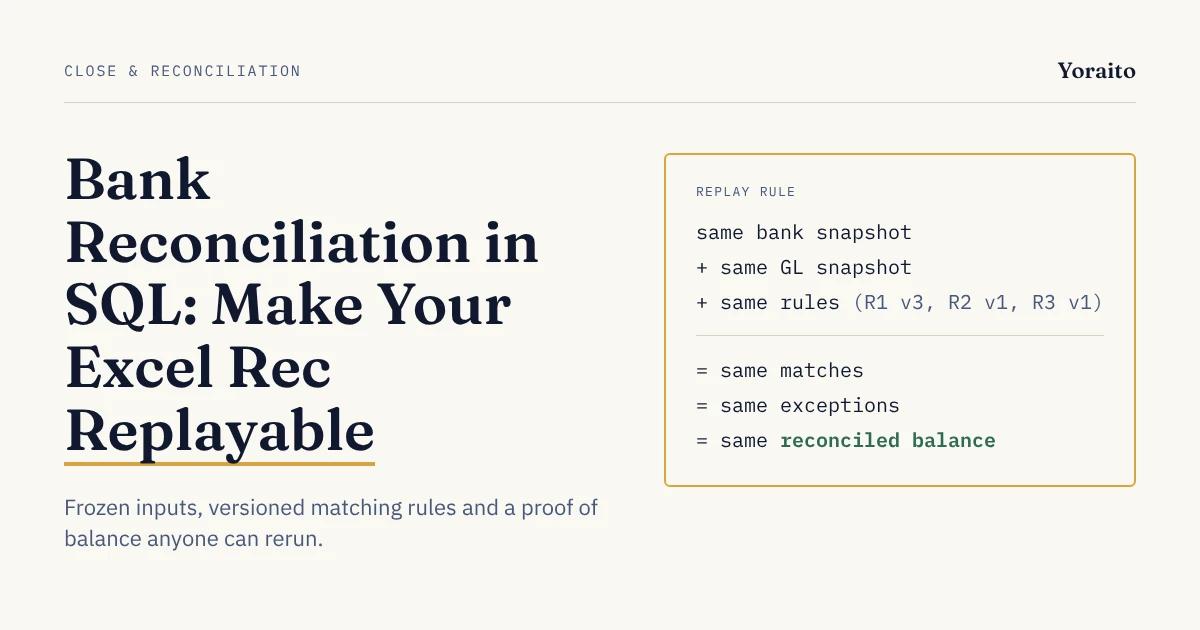
A replayable bank reconciliation is one where anyone can rerun the same rules on the same frozen inputs and get the same matches, exceptions and reconciled balance.
Four terms used in the rest of this post:
- Snapshot: a frozen copy of the bank statement lines or GL cash entries, stamped with when it was loaded. Later edits create a new snapshot; they never change the old one.
- Matching rule: a written condition for pairing a bank line with GL entries, such as "same amount and same reference." Each rule has an ID and a version number.
- Match record: one row that links a bank line to a GL entry and names the rule and version that linked them.
- Exception: a bank line or GL entry that no rule matched. It needs a person, not a formula.
Excel can hold the same logic. What it can't easily hold is proof that the logic you see today is the logic that ran in March.
Why do Excel bank reconciliations break down?
Spreadsheet errors are common and well studied. In a review of field audits of real spreadsheets, Raymond Panko of the University of Hawaii found that the more recent and more careful audits "found errors in at least 86% of the spreadsheets audited" (Panko, EuSpRIG, 2000). That data is old, but nothing about how workbooks are built has removed the cause: logic and data live in the same cells.
For bank recs specifically, the common Excel method has four weak points. Typical tutorials match each bank line with MATCH or VLOOKUP on an ID or amount (ExcelDemy is a representative example).
- First hit wins. MATCH and VLOOKUP return the first matching row. Two $1,250.00 payments in the same week can both match the same GL entry, and nothing flags it.
- One-to-one only. A single bank deposit that covers 14 customer receipts does not fit a lookup. It gets matched by hand, and the reasoning stays in someone's head.
- Tick marks are not evidence. A green fill or an "x" in a column records that someone decided, not why.
- No history. Overwrite a formula, re-sort a tab or paste new data over old, and the prior state is gone unless someone saved a copy.
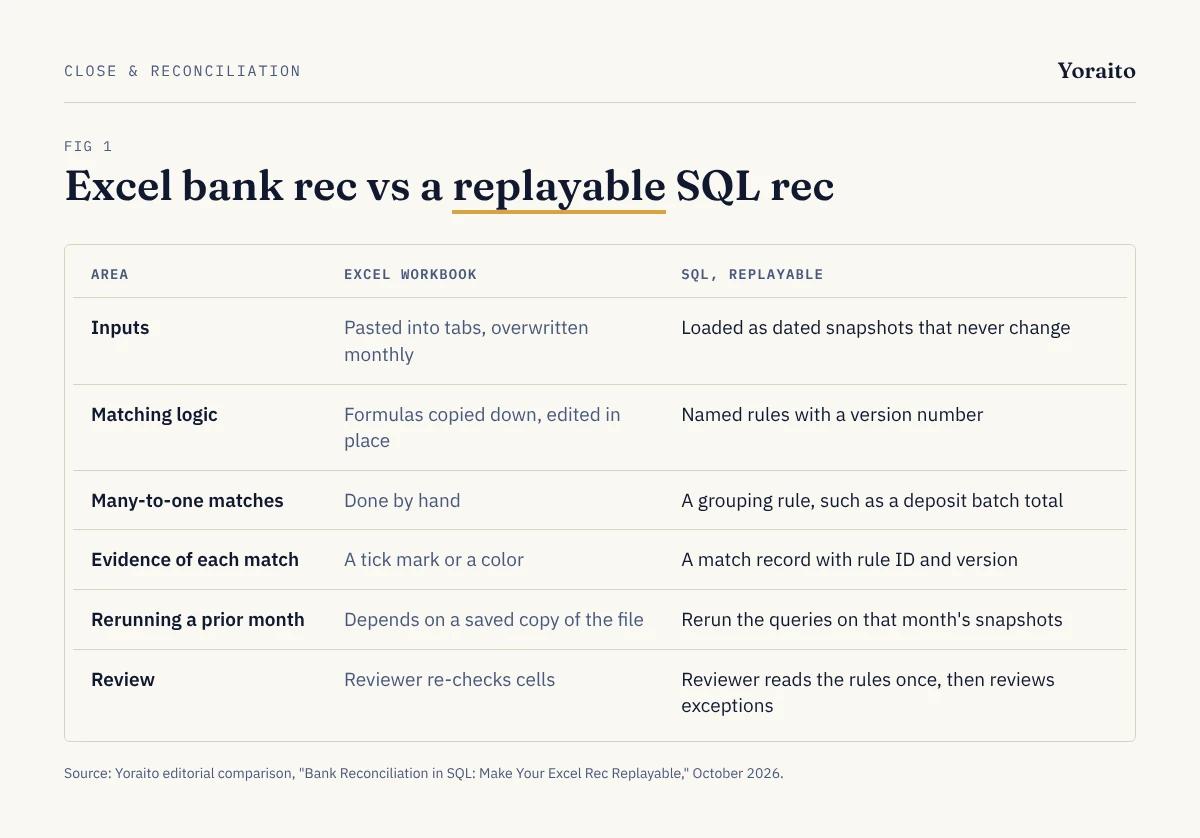
- Inputs: Excel: pasted into tabs, overwritten monthly; SQL: loaded as dated snapshots that never change.
- Matching logic: Excel: formulas copied down, edited in place; SQL: named rules with a version number.
- Many-to-one matches: Excel: done by hand; SQL: a grouping rule, such as a deposit batch total.
- Evidence of each match: Excel: a tick mark or a color; SQL: a match record with rule ID and version.
- Rerunning a prior month: Excel: depends on a saved copy of the file; SQL: rerun the queries on that month's snapshots.
- Review: Excel: a reviewer re-checks cells; SQL: a reviewer reads the rules once and reviews the exceptions.
What data do you need before you write any SQL?
Two tables and two habits. If your ERP or accounting system can export cash activity, and your bank provides a statement file, this is enough to start.
- bank_lines: one row per statement line: line_id, account_id, posted_date, amount, reference, description, snapshot_id.
- gl_cash_lines: one row per GL entry to the cash account: entry_id, account_id, entry_date, amount, reference, deposit_batch_id, snapshot_id.
- Habit 1, never update a loaded row. If the bank file is corrected, load it again as a new snapshot.
- Habit 2, lock the snapshot pair for the period. The September rec runs against one bank snapshot and one GL snapshot, and the run records which.
Signs should agree on both sides: deposits positive, payments negative. Expect the first SQL rec to need more time cleaning references and signs than writing the matching rules.
Want every match to come with the source rows, the rule and the SQL behind it? Join the Yoraito waitlist for early access.
How do you write bank matching rules in SQL?
Write each rule as its own query that inserts into a match table, run them in order, and let each rule only see lines that earlier rules left unmatched. The examples below use PostgreSQL syntax and an illustrative schema.
Rule R1, version 3: same amount and same reference.
-- R1 v3: exact amount and reference
INSERT INTO rec_matches (run_id, rule_id, rule_version, bank_line_id, gl_entry_id)
SELECT :run_id, 'R1', 3, b.line_id, g.entry_id
FROM bank_lines b
JOIN gl_cash_lines g
ON g.account_id = b.account_id
AND g.amount = b.amount
AND g.reference = b.reference
WHERE b.snapshot_id = :bank_snapshot
AND g.snapshot_id = :gl_snapshot;
R1 assumes a reference appears only once per account in the period. If yours repeat, add the same uniqueness check used in R2.
Rule R2, version 1: same amount, dates within 3 days, and only one possible partner on each side. The window counts are what stop the "first hit wins" problem. If two GL entries could match, the rule refuses to guess and the line becomes an exception.
-- R2 v1: amount + 3-day window, unambiguous pairs only
INSERT INTO rec_matches (run_id, rule_id, rule_version, bank_line_id, gl_entry_id)
SELECT :run_id, 'R2', 1, line_id, entry_id
FROM (
SELECT b.line_id, g.entry_id,
COUNT(*) OVER (PARTITION BY b.line_id) AS gl_options,
COUNT(*) OVER (PARTITION BY g.entry_id) AS bank_options
FROM bank_lines b
JOIN gl_cash_lines g
ON g.account_id = b.account_id
AND g.amount = b.amount
AND ABS(g.entry_date - b.posted_date) <= 3
WHERE b.snapshot_id = :bank_snapshot
AND g.snapshot_id = :gl_snapshot
AND NOT EXISTS (SELECT 1 FROM rec_matches m
WHERE m.run_id = :run_id AND m.bank_line_id = b.line_id)
AND NOT EXISTS (SELECT 1 FROM rec_matches m
WHERE m.run_id = :run_id AND m.gl_entry_id = g.entry_id)
) c
WHERE gl_options = 1 AND bank_options = 1;
Rule R3, version 1: one bank deposit equals the sum of a GL deposit batch. This is the many-to-one case Excel lookups can't express.
-- R3 v1: bank deposit = total of GL receipts in one deposit batch
INSERT INTO rec_matches (run_id, rule_id, rule_version, bank_line_id, gl_entry_id)
SELECT :run_id, 'R3', 1, b.line_id, g.entry_id
FROM bank_lines b
JOIN (SELECT deposit_batch_id, SUM(amount) AS batch_total
FROM gl_cash_lines
WHERE snapshot_id = :gl_snapshot AND deposit_batch_id IS NOT NULL
GROUP BY deposit_batch_id) t
ON t.deposit_batch_id = b.reference AND t.batch_total = b.amount
JOIN gl_cash_lines g
ON g.deposit_batch_id = t.deposit_batch_id AND g.snapshot_id = :gl_snapshot
WHERE b.snapshot_id = :bank_snapshot;
-- add the same NOT EXISTS filters as R2 so earlier matches are skipped
Exceptions are just what's left. No rule, no match:
SELECT b.*
FROM bank_lines b
WHERE b.snapshot_id = :bank_snapshot
AND NOT EXISTS (SELECT 1 FROM rec_matches m
WHERE m.run_id = :run_id AND m.bank_line_id = b.line_id);
Run the same query against gl_cash_lines for the book side. For how each match should explain itself to a reviewer, see our post on what every AI bank reconciliation match should explain. The same standard applies whether a person, a query or a model proposed the match.
How do you prove the reconciliation balances?
The matching tells you which items cleared. The proof of balance tells you the rec is complete. Here is an illustrative September run for one operating account.
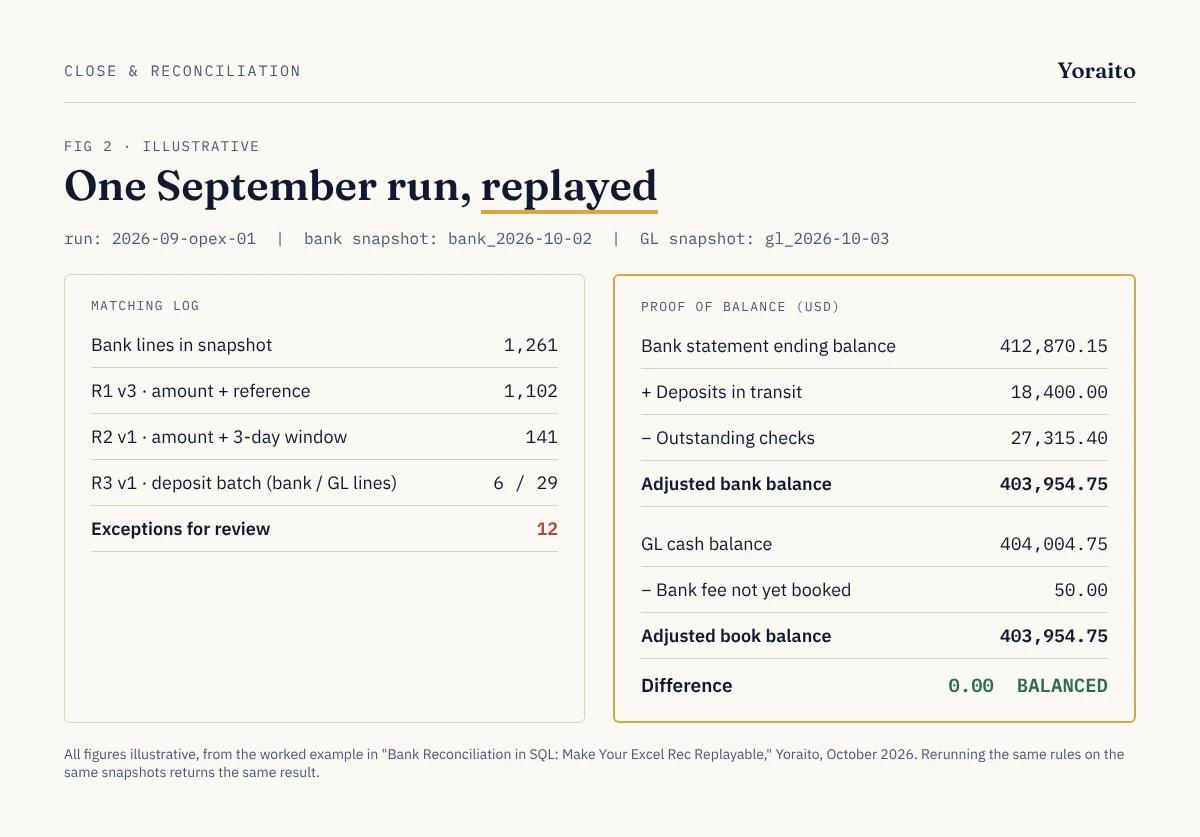
- Bank lines in the snapshot: 1,261.
- Matched by R1 v3 (amount and reference): 1,102.
- Matched by R2 v1 (amount and 3-day window): 141.
- Matched by R3 v1 (deposit batch): 6 bank deposits covering 29 GL receipts.
- Exceptions for review: 12.
And the proof, all figures illustrative:
- Bank statement ending balance: $412,870.15.
- Plus deposits in transit: $18,400.00.
- Less outstanding checks: $27,315.40.
- Adjusted bank balance: $403,954.75.
- GL cash balance: $404,004.75.
- Less bank fee not yet booked: $50.00.
- Adjusted book balance: $403,954.75. Difference: $0.00.
Deposits in transit and outstanding checks are not typed in. They are the GL-side exceptions, summed by a query. That is the difference from a template: if someone asks in February how you got $27,315.40, you rerun the September run and get the same list of checks.
What will your auditor want to see?
Under PCAOB AS 1105, when an auditor uses information produced by the company, they must "test the accuracy and completeness of the information" or test the controls over it (PCAOB AS 1105.10). A bank rec is that kind of information.
The PCAOB has flagged this area in its inspections. Its April 2024 staff Spotlight on data and reports reminded auditors to "identify the sources of the underlying data in reports as well as how the reports are generated" (PCAOB, April 18, 2024). A replayable rec answers both parts directly: the snapshots are the source, and the versioned queries are how it was generated.
Use this as the evidence package for each month:
- The two snapshot IDs and when each was loaded.
- The rule list with versions, and a note of any rule changed since last month.
- The match table for the run, so any line can be traced to its rule.
- The exception list with a resolution note for each item.
- The proof of balance query output.
- Preparer and reviewer sign-off, by two different people, with dates.
At year end this becomes the reconciliation support on your PBC list. If AI proposes any of the matches, our list of questions auditors ask about AI reconciliation covers what else they will want.
How do you move from Excel to SQL without disrupting the close?
Run both for two or three closes before you retire the workbook.
- 1. Pick one account. The highest-volume operating account usually gives the clearest test.
- 2. Load last month's data as snapshots and write R1 from your current matching habit.
- 3. Compare results line by line with last month's Excel rec. Every difference is either a spreadsheet slip or a missing rule.
- 4. Add rules only when a pattern repeats. One-off items belong in the exception list, not in a new rule.
- 5. Version every rule change and note why it changed.
- 6. Retire the workbook once two consecutive months tie to the cent with no unexplained differences.
The same habit carries into reporting. If your sponsor pack has a cash line, the tie-out query in our post on PE portfolio reporting can point at the same reconciled balance.
FAQ
Can you do a bank reconciliation in SQL?
Yes. Load the bank statement lines and GL cash entries into two tables, write each matching rule as a query that inserts into a match table, list what remains unmatched as exceptions, and run a proof-of-balance query. Any SQL database works, including a data warehouse if your team already has one.
Do I need to stop using Excel?
No. You can keep Excel for review and presentation and move only the matching and the proof into SQL. The key is that Excel reads the results instead of producing them, so the logic can't be changed by accident.
How do you handle one deposit that covers many receipts?
Group the GL receipts by deposit batch and compare the batch total to the bank deposit, as in rule R3 above. If your system does not record a batch ID, match on date and total with a tight window, and send anything ambiguous to exceptions.
What makes a reconciliation auditable?
An auditor needs to see where the data came from, how the matches were made, and who reviewed the result. Frozen inputs, versioned rules, a match record per line and a signed-off exception list cover all three.
What should you do this week?
Take last month's Excel rec for your busiest account and write down, in plain sentences, every rule your team actually uses to match lines. That list is your first version of R1 to R3, and it often surfaces a rule nobody had written down.
To hear when Yoraito opens up, join the waitlist.