
Excel Automation for Accounting: Keep the Audit Trail
Automate recurring Excel workbooks with AI without losing the audit trail: let AI draft the logic, keep the numbers on fixed formulas or SQL, version every change and tie every schedule to the ledger.
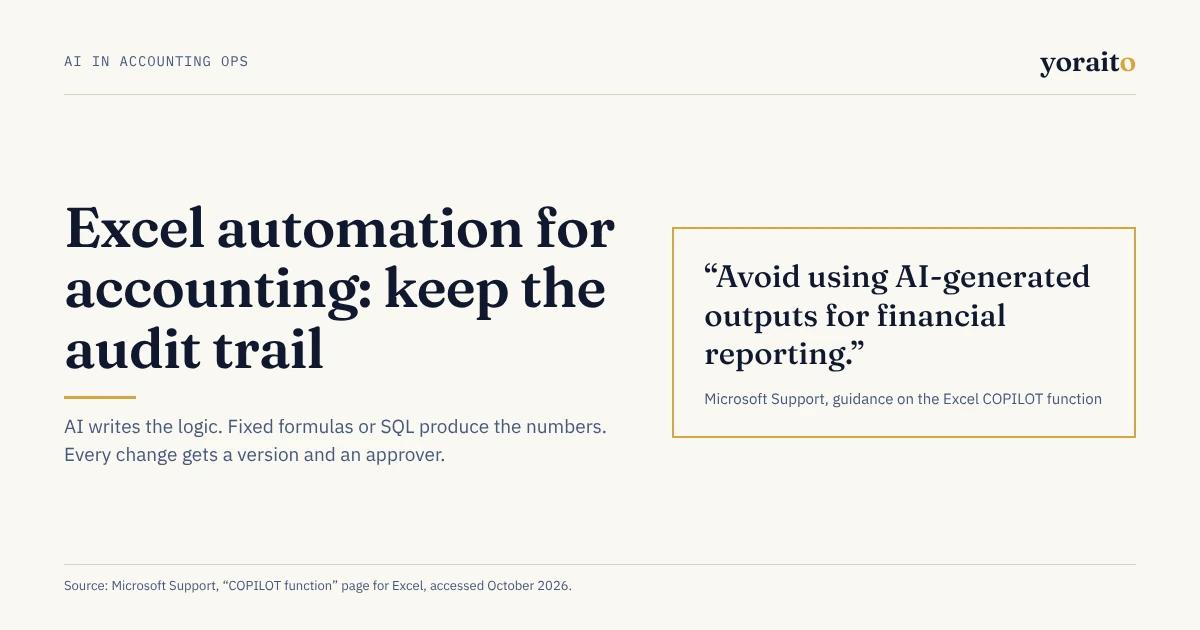
Microsoft's own support page for the Excel COPILOT function says to "avoid using AI-generated outputs for financial reporting." That line is the best brief you will get for automating recurring workbooks: let AI write and check the logic, and let fixed formulas or SQL produce the numbers.
TL;DR: Excel automation in accounting keeps its audit trail when AI drafts the logic and fixed formulas or SQL produce the numbers. Separate inputs from logic, version every logic change with an approver, tie inputs and outputs to the ledger, and never let a live AI function calculate a balance that posts.
Which recurring workbooks are worth automating?
A recurring workbook is any spreadsheet the team rebuilds or rolls forward every period with the same structure, such as a prepaid amortization schedule, an accrual schedule or a fixed asset roll-forward. These are the workbooks where automation pays, because the work repeats and the rules can be written down.
Good candidates share three traits: the structure is the same every month, the logic can be stated as rules, and the ending balance ties to a general ledger account. Typical examples:
- Prepaid expense amortization
- Recurring accruals, such as bonus, commissions and regular vendor services
- Fixed asset roll-forward and depreciation
- Deferred revenue waterfalls
- Bank reconciliation workpapers
- Flux and variance workbooks
Poor candidates are one-off analyses and models built mostly on judgment. Automate those later, if at all.
What goes wrong when AI edits a workbook?
Microsoft is direct about the limits of its own tools. The COPILOT function page says the function "uses AI and can give incorrect responses," tells users to "use native Excel formulas (e.g., SUM, AVERAGE, IF) for any task requiring accuracy or reproducibility," and warns that results can change over time even when the arguments stay the same. For Agent Mode in Excel, introduced on September 29, 2025, Microsoft reported 57.2% accuracy on SpreadsheetBench, a benchmark of spreadsheet tasks, in an evaluation it ran itself (Microsoft 365 blog).
None of that makes AI useless in Excel. It moves the risk. The hard part of a recurring workbook was never writing the formula. It is knowing what changed, who changed it, and whether last month would come out the same if you ran it again today.
That was true before AI. KPMG's guidance on end-user computing says spreadsheets and similar tools "often lack fundamental data and processing integrity controls, making them prone to errors," and that "access and change controls are key components" of managing the risk (KPMG, September 2022). AI makes changes faster, so the change trail matters more. COSO's 2026 guidance on generative AI, as summarized by Deloitte, lists "logging/traceability (model/version, prompts, key inputs/outputs, approvals)" as a control building block.
How do you automate a workbook without losing the audit trail?
Six steps keep a recurring workbook reviewable after AI starts helping with it:
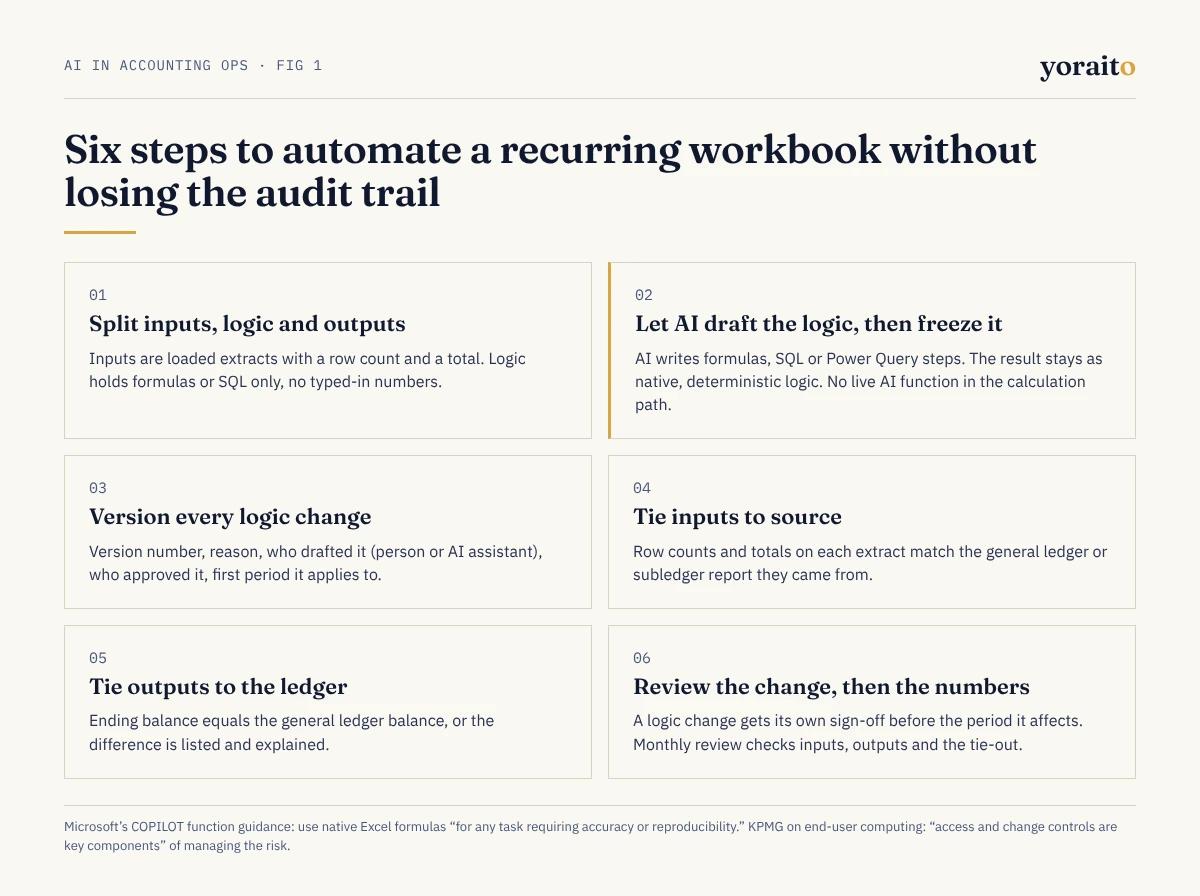
- 1. Split inputs, logic and outputs. Inputs are loaded extracts with a row count and a total. Logic is formulas or SQL only, with no typed-in numbers. Outputs are what gets reviewed and posted.
- 2. Let AI draft the logic, then freeze it. Use AI to write formulas, SQL or Power Query steps from a plain description, and to explain inherited formulas. Then keep the result as native, deterministic logic. No live AI function sits in the calculation path.
- 3. Version every logic change. Each change gets a version number, a short reason, who drafted it (a person or an AI assistant), who approved it and the first period it applies to.
- 4. Tie inputs to source. Row counts and totals on each extract match the general ledger or subledger report they came from.
- 5. Tie outputs to the ledger. The schedule's ending balance equals the account balance in the general ledger, or the difference is listed and explained.
- 6. Review the change separately from the numbers. A logic change gets its own sign-off before the period it affects. The monthly review then checks inputs, outputs and the tie-out.
Want recurring schedules that come with the source rows, the logic version and the SQL behind every balance? Join the Yoraito waitlist for early access.
What does a replayable roll-forward look like?
Take a $36,000 annual software subscription paid upfront, starting July 1, 2026, and expensed over 12 months. Straight-line, that is $3,000 a month. At the end of October 2026, four months have been expensed ($12,000) and $24,000 remains in prepaid expenses.
In a workbook, that lives in a row of formulas someone copied down. Written as SQL, it is one query that anyone can rerun against the same data and get the same answer:
-- Prepaid amortization for October 2026 (straight-line, monthly)
-- logic_version prepaid_sl_v3, approved by the controller on 2026-09-28
SELECT
p.prepaid_id,
p.vendor,
p.total_amount,
p.term_months,
ROUND(p.total_amount / p.term_months, 2) AS monthly_expense,
'prepaid_sl_v3' AS logic_version
FROM prepaids p
WHERE p.start_month <= DATE '2026-10-01'
AND p.start_month + p.term_months * INTERVAL '1 month' > DATE '2026-10-01';
Then the tie-out, which is the line an auditor cares about most:
-- Does the schedule tie to the general ledger at period end?
SELECT
s.gl_account,
s.ending_balance AS schedule_balance,
g.ending_balance AS gl_balance,
s.ending_balance - g.ending_balance AS difference
FROM schedule_balances s
JOIN gl_balances g
ON g.gl_account = s.gl_account
AND g.period = s.period
WHERE s.period = '2026-10';
Rounding belongs in the logic, not in a manual plug. If a total does not divide evenly, write the rule (for example, the final month absorbs the remainder) into the next logic version and note it in the change log. A change log for this schedule might read:
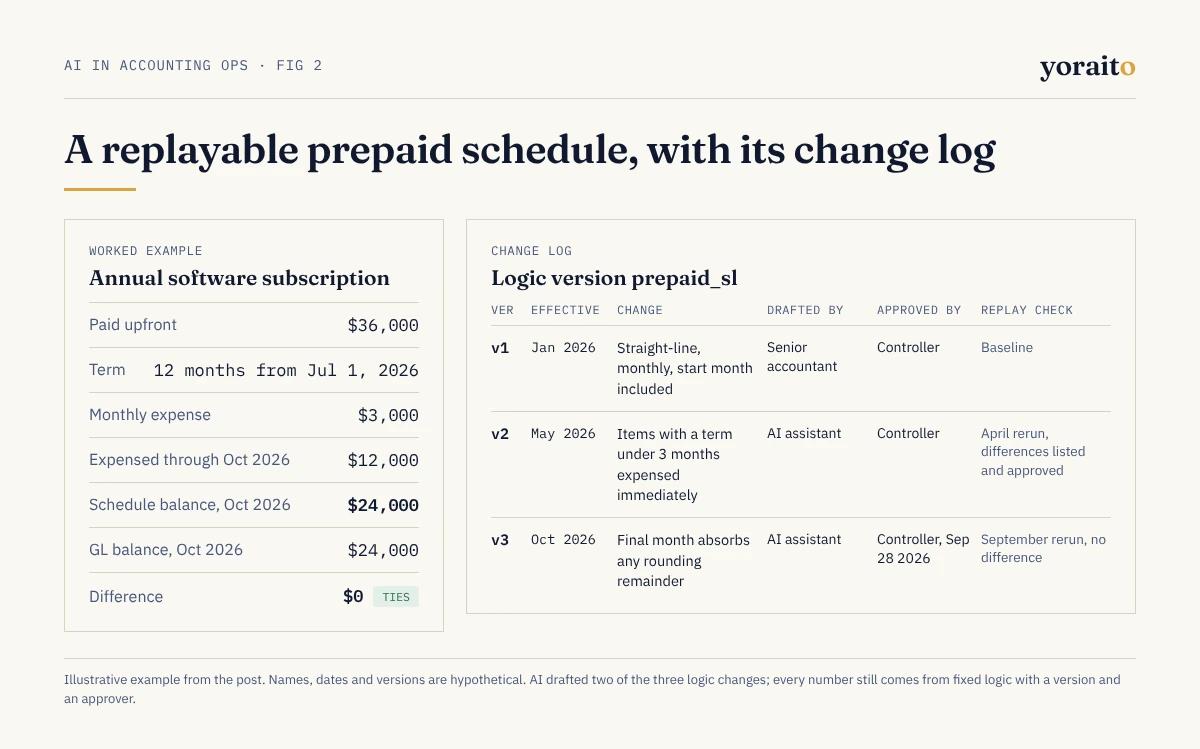
- v1, January 2026: straight-line, monthly, start month included. Drafted by a senior accountant; approved by the controller. Baseline.
- v2, May 2026: items with a term under 3 months are expensed immediately. Drafted by an AI assistant; approved by the controller. April rerun under v2, differences listed and approved.
- v3, October 2026: the final month absorbs any rounding remainder. Drafted by an AI assistant; approved by the controller on September 28, 2026. September rerun under v3, no difference.
The AI did real work in that log. It drafted two of the three changes. But every number the schedule produces comes from fixed logic with a version and an approver, so last month can be replayed exactly. The same pattern applied to the bank reconciliation is covered in AI bank reconciliation: what every match should explain.
Where should AI help, and where should it stay out?
- Drafting formulas, SQL or Power Query steps: yes, with a reviewer approving the version.
- Explaining an inherited workbook: yes. It is often the fastest way to document logic nobody wrote down.
- Flagging typed-in numbers, broken references and inconsistent formulas: yes, as flags for a person to clear.
- Suggesting mappings for new vendors or accounts: yes, as suggestions a person approves.
- Drafting flux commentary: yes, if every figure in the draft points to the query that produced it.
- Calculating a balance that posts: no. Use fixed logic.
What will your auditor want to see?
For each recurring schedule, every period:
- The input extracts, with row counts and totals that tie to the source report
- The logic version in effect and its approval
- The change log since the last audit
- The tie-out to the general ledger
- The preparer and reviewer sign-offs, with dates
- The ability to rerun a prior period and get the same result
That list maps closely to what auditors request at year-end, which our PBC list guide walks through. The AI audit trail checklist covers the fields to log when an AI assistant drafts any of the changes, and 9 questions your auditor will ask about AI reconciliation helps you prepare for the conversation.
FAQ
Can AI automate Excel workbooks for accounting?
Yes, for drafting, explaining and checking the logic. Keep the numbers themselves on native formulas or SQL. Microsoft's own guidance for the COPILOT function recommends native formulas for any task that needs accuracy or reproducibility.
Is Copilot in Excel accurate enough for accounting?
Microsoft reported 57.2% accuracy for Agent Mode in Excel on SpreadsheetBench in its own evaluation, and its COPILOT function page advises against using AI-generated outputs for financial reporting. Use it to draft and review logic, not to produce posted numbers.
How do you control spreadsheets for SOX?
Treat key spreadsheets as end-user computing: keep an inventory, restrict access, control and log changes, protect input and formula integrity, and review them. KPMG's end-user computing guidance names access and change controls as key components.
Should recurring schedules move out of Excel entirely?
Not necessarily. Stable, high-volume schedules benefit from logic held in SQL or a system, with Excel kept as the review surface. Low-volume or judgment-heavy workbooks can stay in Excel if they follow the six steps above.
What is the next step?
Pick the recurring workbook your team trusts least. Before next close, split it into inputs, logic and outputs, and write its logic version and approver on the first tab. To hear when Yoraito opens up, join the waitlist.