
Payout Reconciliation: Tie Every Deposit to Its Orders
How to reconcile marketplace and processor payouts: a gross-to-net bridge, a payout clearing account, a six-step checklist, a SQL tie-out and the evidence auditors ask for.
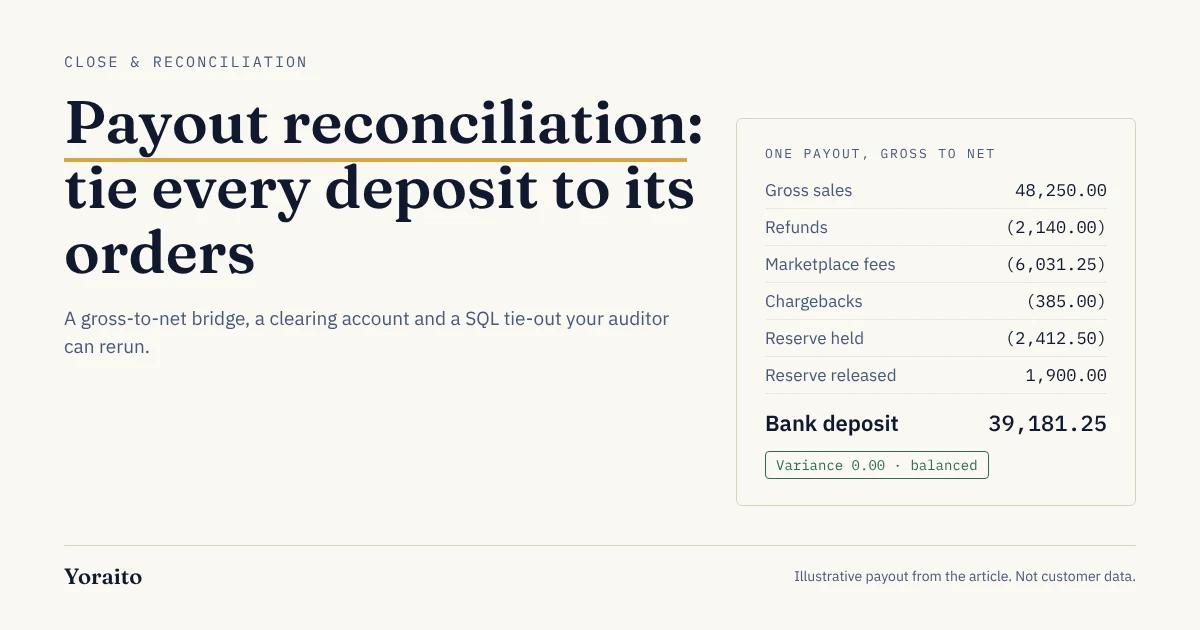
Your marketplace says you sold $48,250 last week. Your bank says $39,181.25 arrived. Payout reconciliation is the work of proving, line by line, how the first number became the second, and keeping that proof where an auditor can replay it.
TL;DR: Payout reconciliation ties each deposit from a marketplace or payment processor back to the orders, refunds, fees, chargebacks and reserve movements inside it. Book gross sales and every deduction through a payout clearing account, match each payout to its bank deposit, and investigate anything left in the clearing account at month end.
What is payout reconciliation?
Payout reconciliation is the process of matching each lump-sum deposit from a marketplace or processor to the individual transactions that make it up, so revenue is booked gross and every deduction has a home.
It sits between two reconciliations you already run. The bank rec proves cash. The order-to-ledger tie proves revenue. The payout rec connects them, because platforms like Amazon, Shopify Payments, Stripe and Adyen never send you one deposit per sale. They batch days of activity, net out their own charges, and send what is left.
If you only book the deposit, revenue is understated, fees disappear into a net number, and nobody can say whether the platform paid you the right amount. That is the problem this post solves.
Why doesn't the deposit match your sales?
Because a payout is a net figure built from at least six moving parts, and most of them land in a different period from the sale that caused them.
- Platform and processing fees: referral, fulfillment, subscription and card fees are deducted before cash moves.
- Refunds: a refund issued this week reduces this week's payout, even when the sale was last month.
- Chargebacks and disputes: the disputed amount, plus any dispute fee, comes out of the payout while the case is open.
- Reserves and holds: Shopify describes a reserve as "a temporary hold on a portion, in some cases a full amount, of transactions" for a set period, and it reduces the payout you receive (Shopify Help Center). Releases come back later as a positive line.
- Sales tax the platform collects: where the marketplace collects and remits tax as the facilitator, the tax can appear on the order but never reach you.
- Timing: settlement periods rarely line up with your month end, so a payout often straddles two periods.
A gross-to-net bridge is a schedule that starts at gross sales, subtracts each deduction type, and ends at the exact bank deposit. If the bridge does not close to the cent, something is missing.
How should you book payouts in the ledger?
Use a payout clearing account for each platform. It is a balance sheet account that holds what the platform owes you between the sale and the deposit.
A payout clearing account is a temporary asset account that receives gross sales and every platform deduction, and is relieved when the deposit hits the bank. At month end its balance should equal payouts in transit plus reserves held.
For each settlement, the entry looks like this:
- Debit payout clearing, credit revenue: gross sales.
- Debit sales returns, credit payout clearing: refunds.
- Debit marketplace fees expense, credit payout clearing: fees.
- Debit chargeback losses (or a disputes receivable), credit payout clearing: chargebacks.
- Debit reserve receivable, credit payout clearing: reserve held. Reverse it when the reserve is released.
- Debit cash, credit payout clearing: the bank deposit.
When every line of the settlement report is booked this way, the clearing account nets to zero for that payout. Anything left over is your exception list.
How do you reconcile a payout, step by step?
This is the checklist we would hand a new staff accountant. It works for any platform that publishes a settlement or payout report.
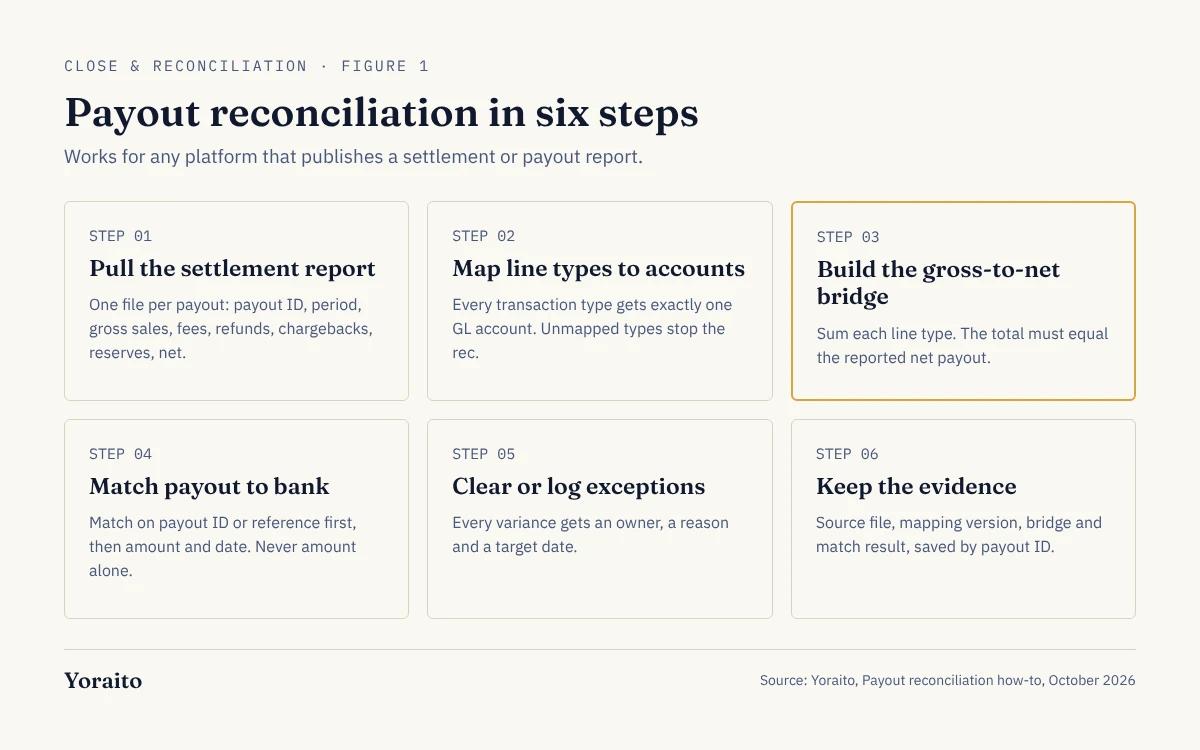
- Step 1, pull the settlement report: one file per payout, with payout ID, period, gross sales, fees, refunds, chargebacks, reserves and net.
- Step 2, map line types to accounts: every transaction type in the report gets exactly one GL account. Unmapped types stop the rec.
- Step 3, build the gross-to-net bridge: sum each line type and confirm the total equals the reported net payout.
- Step 4, match the payout to the bank: match on payout ID or reference first, then amount and date. Do not match on amount alone.
- Step 5, clear or log exceptions: any variance goes into an exceptions log with an owner, a reason and a target date.
- Step 6, keep the evidence: save the source file, the mapping version, the bridge and the match result together, by payout ID.
Want every payout match to come with the source rows, the rule and the SQL behind it? Join the Yoraito waitlist for early access.
What does a worked example look like?
Here is one weekly payout, using illustrative numbers. The settlement report shows six line types. The bridge closes to the deposit.
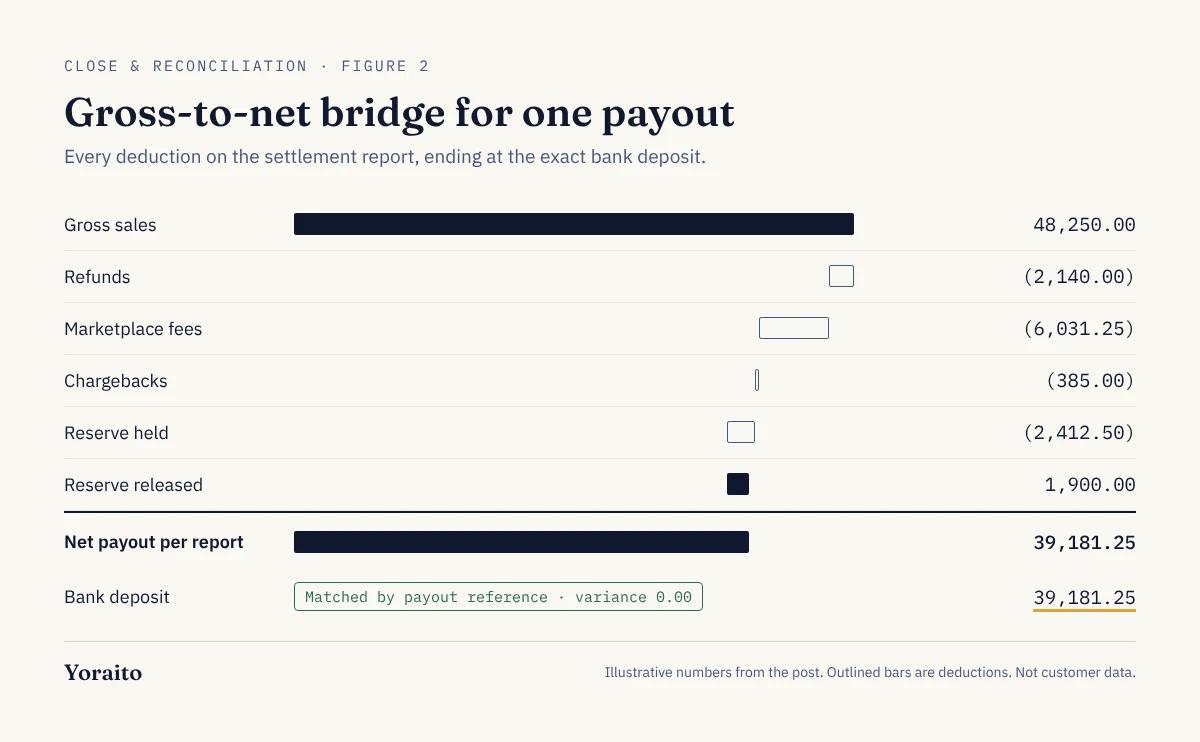
- Gross sales: 48,250.00
- Refunds: (2,140.00)
- Marketplace fees: (6,031.25)
- Chargebacks: (385.00)
- Reserve held: (2,412.50)
- Reserve released: 1,900.00
- Net payout per report: 39,181.25
- Bank deposit: 39,181.25; variance 0.00
The same tie-out in SQL, so anyone can rerun it against the raw files:
-- Tie each payout's line items to its bank deposit
SELECT p.payout_id,
SUM(l.amount) AS bridge_net,
b.amount AS bank_deposit,
SUM(l.amount) - b.amount AS variance
FROM payout_lines l
JOIN payouts p ON p.payout_id = l.payout_id
LEFT JOIN bank_lines b ON b.reference = p.bank_reference
WHERE p.platform = 'marketplace_a'
AND p.paid_on BETWEEN '2026-09-01' AND '2026-09-30'
GROUP BY p.payout_id, b.amount
HAVING b.amount IS NULL OR SUM(l.amount) <> b.amount;
The query returns only the problems: payouts with no matching deposit, and payouts whose lines do not sum to the deposit. An empty result is your evidence that the month is clean. Because the query and the source files are saved, the result can be reproduced next quarter, which is the point we made in why replay matters in accounting.
Which platform reports should you pull?
Each platform names its report differently. Use the one that maps line items to a specific payout, not a running balance.
- Stripe: Payout reconciliation report; groups transactions in each payout by category such as charges, refunds and fees; only for automatic payouts, and Stripe says it cannot identify which transactions are in an instant payout (Stripe Docs).
- Shopify Payments: Payouts page and payout transactions; shows payout balance and reserved funds separately, with negative reserve lines reducing the payout.
- Adyen (marketplaces): Payout report; Adyen describes it as a 1:1 mapping between a payout transfer and the payments, refunds and adjustments in it; on-demand payouts are not included and need the Accounting report.
- Amazon: settlement report per settlement period; reconcile each settlement ID, not each calendar month.
If you sell on several channels, run the same six steps per platform and keep one clearing account per platform. Mixing them makes exceptions impossible to trace.
What will your auditor ask about payouts?
Auditors care less about the matching tool and more about whether the result is complete and repeatable. Expect these requests at year end, alongside the rest of your PBC list reconciliations:
- Completeness: show that every payout in the platform report for the year appears in the bank, and every platform deposit in the bank appears in a report.
- Revenue at gross: show how gross sales in the ledger tie to the platform's gross figure, not the net deposits.
- Clearing account rollforward: opening balance, activity, closing balance, and what makes up the closing balance.
- Reserve schedule: amounts held, release dates and anything past its expected release.
- Form 1099-K tie-out: the IRS says a payment settlement entity files a 1099-K when gross payments to a payee exceed $20,000 and the number of transactions exceeds 200 (IRS, Oct 23 2025). If you receive one, be ready to explain the gap between its gross figure and your booked revenue.
A rec that only exists as a highlighted spreadsheet answers none of these quickly. A rec stored as source files, a mapping and a query answers all of them. We cover what that record should contain in the AI audit trail checklist, and how matching rules should explain themselves in AI bank reconciliation.
Frequently asked questions
Should I record marketplace sales gross or net?
Gross, in most cases. Record the full sale as revenue and the platform's fees as an expense, then confirm the treatment with your auditor, since principal versus agent judgments can change the answer for some business models.
What causes a payout to not match the bank deposit?
The usual causes are a missing line type in your mapping, a payout split across two bank days, an instant or on-demand payout that is not in the standard report, or a bank fee on the incoming transfer. Check the payout ID first, then the line totals.
How often should I reconcile marketplace payouts?
Match payouts as they land, ideally daily or weekly, and run the full clearing account review at month end. Small daily checks keep the month-end exceptions list short.
What is left in the payout clearing account at month end?
Payouts in transit (sales settled by the platform but not yet deposited) and, if you book them there, reserves held. Anything else is an exception to investigate.
What should you do next?
Pick one platform, pull last month's payout reports, and build the gross-to-net bridge for every payout. If the clearing account does not net to payouts in transit plus reserves, you have found your first exceptions. For the bank side of the same process, see how to make your bank rec replayable in SQL.
To hear when Yoraito opens up, join the waitlist.